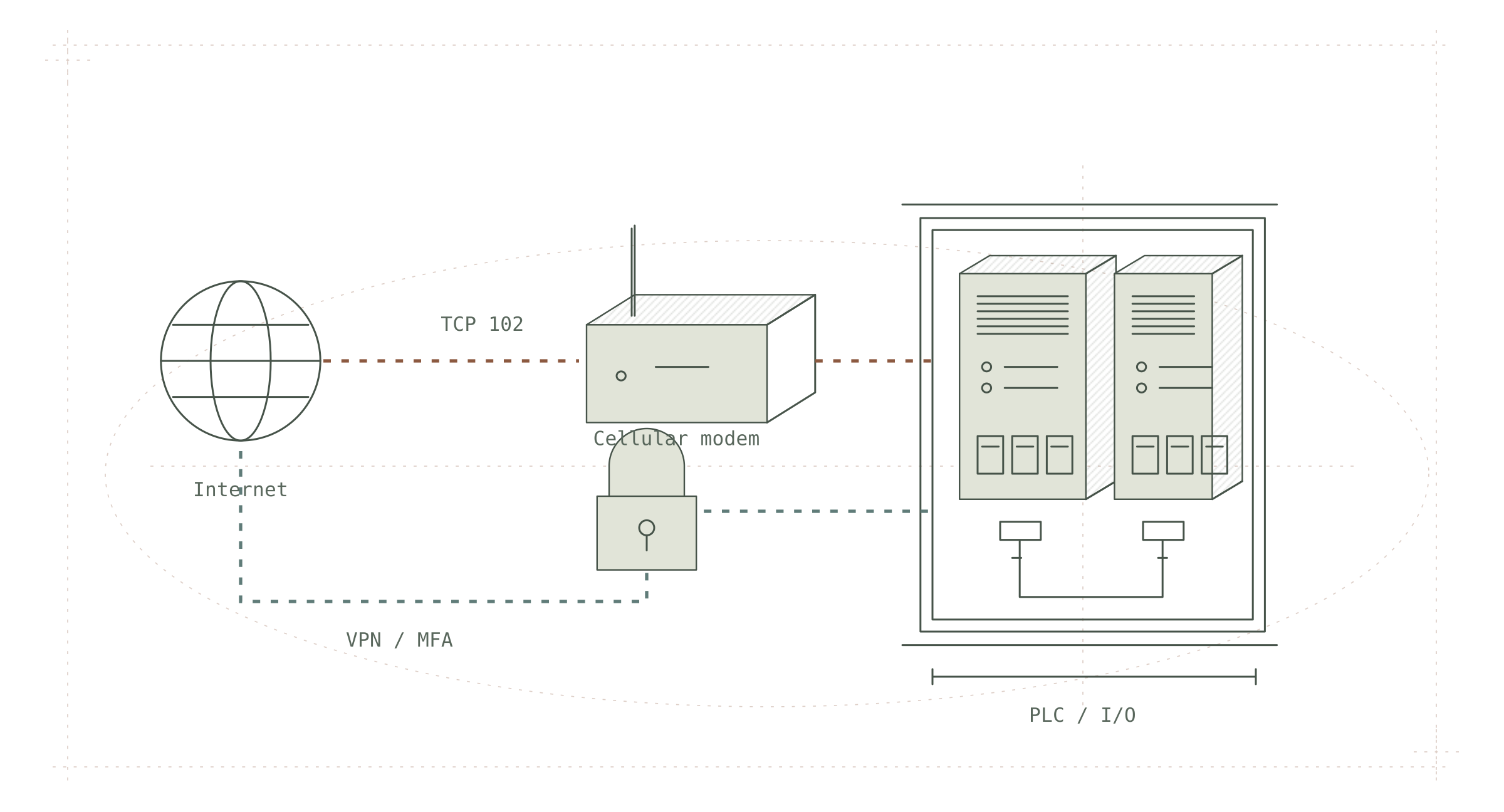
Picture a small drinking water plant. A PLC runs the pump that draws water from the well, watches the tank level and doses the chlorine. Nobody is on site at night; the operator checks the level from home on a phone. Everyone is happy with this arrangement.
What if the same PLC can also be seen by someone on the other side of the world who does not even know the plant's name? What if they can read the level and write the pump command?
The plant in this example is fictional. The threat activity reported by the agencies is real. On 19 August 2026, the NSA, CISA, FBI, the Department of Energy and the Environmental Protection Agency published a joint advisory: internet-exposed Siemens S7 series PLCs are being actively searched for, read, and prepared for write operations. CISA, AA26-231A
Let’s follow the access path to the PLC, examine the device’s authorization settings and identify what to check at the site.
A PLC (Programmable Logic Controller) is a small industrial computer that reads field sensors and sends commands to motors, valves and pumps. We write its program with engineering software; for Siemens that software is TIA Portal. The screen the operator watches is the HMI. The classic Siemens communication example in this article uses S7comm over TCP port 102. The protocol and access model depend on the CPU family, firmware and engineering software version. A port is the number that tells you which door on a device offers which service. Services such as Censys and ZoomEye regularly scan the whole internet and list which address has which port open; think of them as search engines for devices.
How does a PLC end up on the internet?
Nobody sets up a PLC saying "let's put it on the internet." Yet scanning services keep finding them, year after year. What puts a PLC on the internet is usually a pile of small conveniences stacked on top of each other.
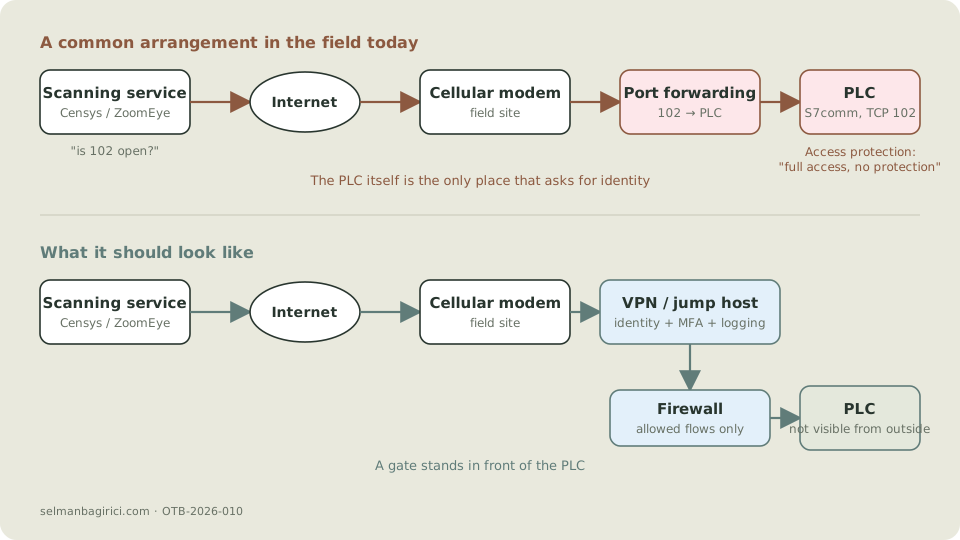
One possible arrangement goes like this: a cellular modem is installed at a remote site. During commissioning, the integrator opens a port forwarding rule on the modem so they can connect remotely; inbound traffic on port 102 goes straight to the PLC. The job finishes, the integrator leaves, the rule stays. A year later the person responsible for the site changes; nobody remembers what sits behind the modem.
The UK's National Cyber Security Centre said exactly this in August 2026: do not assume OT is unreachable from the internet without checking; unintended exposure arises through "misconfigurations, legacy connections, or unmanaged assets." NCSC, 27 August 2026
Enlarge details
On the red path, the only place that authenticates anyone is the PLC itself. On the blue path there is a gate before the PLC; that gate asks for identity, keeps logs and can require multi-factor authentication. The April 2026 advisory from the US agencies says this plainly: even if the PLC itself does not support multi-factor authentication, the VPN or gateway in front of it can provide it. CISA, AA26-097A
The attackers in the August advisory are looking for sites where that gate does not exist. Their method is simple: list Siemens devices with port 102 open on Censys and ZoomEye. The models named in the advisory cover the entire S7-200, S7-300, S7-400, S7-1200 and S7-1500 series. CISA, AA26-231A
What becomes possible without a password?
A PLC being visible from the internet and a PLC accepting written commands are not the same thing. Between them sits the device's access protection.
Siemens S7-1500 CPUs have four authorization levels. The manufacturer's manual describes the "HMI access" level like this: only HMI-type access and diagnostic data are reachable without a password; downloading blocks or the hardware configuration to the CPU is blocked at this level. Siemens, S7-1500R/H system manual, access protection
The problem is that somebody has to choose those levels. During commissioning the most convenient setting is "full access, no protection," because the integrator does not want to type a password every time they download a program. That is the ground the August advisory stands on: when the attackers meet "default or absent authentication," they can read data blocks over S7comm. The advisory does not define a new vulnerability; it describes activity that uses known vulnerabilities, weak passwords and unnecessary internet exposure. CISA, AA26-231A
Older models are weaker. The S7-300 and S7-400 series have a more limited protection mechanism, and a large share of these devices have been in the field for many years. The operation that is possible changes with the model, the firmware and the chosen protection level. So "S7 PLCs are insecure" is not accurate; "whether a reachable S7 PLC permits reading or writing depends on its model, firmware and access settings" is closer to the truth.
Newer configurations need a separate check: TIA Portal V19 and S7-1500 firmware 3.1 introduce the user- and role-based UMAC access model. Assumptions from legacy access levels cannot be applied unchanged. Siemens, UMAC / TIA Portal V19
What do we see when we look at the packet?
Let's look at the packet structure of an S7comm connection. I decoded the COTP connection request and the following S7 Setup Communication message with TShark.
The connection is established in two steps: first a COTP connection request, then S7's "Setup communication" step. The decode of the second frame reads exactly like this:
S7 Communication
    Header: (Job)
        Protocol Id: 0x32
        ROSCTR: Job (1)
    Parameter: (Setup communication)
        Function: Setup communication (0xf0)
        Max AmQ (parallel jobs with ack) calling: 1
        Max AmQ (parallel jobs with ack) called: 1
        PDU length: 480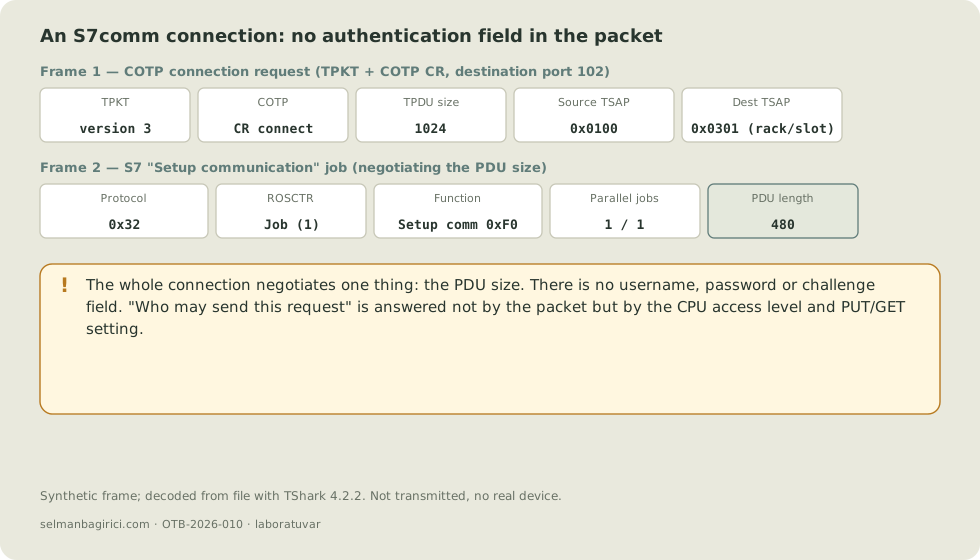
Enlarge details
What stands out is what is not in the packet. The two sides agree on communication parameters, including PDU size and the number of parallel jobs. Here the PDU size is 480 bytes. There is no username, no password, no challenge-response. The answer to "are you allowed to send this request?" is not carried inside the packet. That answer lives in the CPU access level and the PUT/GET setting we discussed in the previous section. "Being visible is not being able to write" is, at the packet level, exactly this: the network gets you to the device, but authorization comes from the device's own configuration.
If you want to reproduce this, the frames were built with scapy and decoded from file with TShark 4.2.2; no real device is needed.
Is reading harmless?
Read access can supply information about the plant for later operations.
The August advisory assesses that the attackers use read access for "persistent reconnaissance in targeted sectors and facilities," test exploitation techniques against specific PLC models, and use reading to prepare for possible write operations. From the data blocks they read, they learn what the plant does, which values matter and which variable triggers what. CISA, AA26-231A
What happens once writing starts is told by the April advisory. It describes Iran-affiliated actors reaching PLCs at US water, energy and local government facilities, pulling project files out with the vendor's software, and modifying or deleting logic. In one case the added logic "disabled critical shutdown and alarm logic, allowing systems to enter unsafe conditions without notifying operators." Data on HMI screens was manipulated as well. In some cases there was operational disruption and financial loss. CISA, AA26-097A
The most important detail here is the alarm logic being switched off. Stopping a pump is a noisy attack; the operator notices and takes over by hand. Silencing the alarm and shifting the level limit is quiet; the operator sees a normal value on the screen while the tank overflows or runs dry.
What has AI changed?
The August advisory contains a sentence we have not seen before: the attackers use "AI-generated Python scripts that imitate legitimate OT monitoring tools." The scripts build on the open-source snap7 library. CISA, AA26-231A
snap7 is a legitimate library that has been used for years to talk S7comm. Maintenance engineers, data collection projects and hobbyists use it to read values from a PLC. So the tool is not new. What is new is that someone who knows nothing about S7comm can get a working script by saying "read the data blocks from the PLC at this address." For S7-1200/1500 examples using classic PUT/GET communication, such a read also needs the CPU option "permit access with PUT/GET communication from remote partner" to be enabled; it is usually switched on during commissioning for HMI or data collection and stays on.
Dragos gave a concrete example in September 2026. While responding to a breach at a government body, they saw an attacker with no OT knowledge or intent asking an AI model. The model noticed that the compromised system was an interface down to a water utility; it then offered the vendors in use, the default configurations and the default passwords, unprompted. The same post adds a balanced note: nothing they see today supports the idea that AI will independently bring down a plant. What changes is that ordinary IT attackers get pointed toward OT, and so the frequency of incidents rises. Dragos, 10 September 2026
We cannot base protection on a protocol being obscure. Network boundaries and device authorization settings remain necessary.
What do we look at in the field?
The first checks concern existing access paths and device settings. The steps both advisories recommend are basics. The table below lists the questions to ask while walking through a site.
| Question | Why it matters | Source |
|---|---|---|
| Which PLCs do we have, on which firmware, reachable from which network? | Without an inventory, "is it on the internet?" cannot be answered. | AA26-231A, NCSC |
| Does the modem at the site have an inbound port forwarding rule, and does the SIM have a public IP? | A rule nobody remembers, on a line with a public IP, puts the PLC straight on the internet. | AA26-097A |
| What access protection level is set on the PLC, and was the password changed? | The "full access, no protection" setting allows reading and writing. | Siemens manual |
| Is the PUT/GET remote access permission enabled? | On S7-1200/1500, snap7-style tools cannot reach data blocks while this permission is off; it is often switched on during commissioning and stays on. | Siemens manual |
| On controllers whose mode switch blocks downloads (e.g. ControlLogix), is the switch in RUN? | On those products RUN blocks remote program changes; the current project must be verified first. On S7-1200/1500 the switch does not block downloads; there the protection is the access level. | AA26-097A |
| Is there a verified, offline backup of the project files? | If the logic was altered, there is no way back without a clean backup. | AA26-097A |
| Does remote access go through a VPN or gateway, with multi-factor authentication? | Even if the PLC cannot do MFA, the gate in front of it can. | AA26-097A |
| Are inbound connection attempts on port 102 happening, and can we see them? | The reconnaissance phase is quiet; without logs it goes unnoticed. | AA26-231A |
A warning on the mode switch: on products where it blocks downloads, turning the switch to RUN locks in the current project. The April advisory says to "review and validate project files" before changing modes. If an attacker has already altered the logic, switching to RUN locks that change in too. CISA, AA26-097A
These checks have been known for a long time. NIST's OT security guide has said for years that control systems should not be reachable from the internet and that network boundaries should follow the real workflow. NIST SP 800-82 Rev. 3, §5.2 The real reason it is not applied is the "it works, don't touch it" reflex in the field, staff turnover and modems that nobody owns.
The next step
After reading this, do not go to Censys or ZoomEye to "find an open PLC." Connecting to someone else's device, even just to read, is a crime and can have unexpected consequences at a water plant. If you are curious, try S7comm on a lab PLC or a simulator at your own desk and see what the access levels change.
If a site is your responsibility, there is one question to ask today:
Behind the modem at the site, is there a port forwarding rule that nobody remembers?